
Want to connect OfficeMaps to your own systems? This article shows you how to create API keys, set up webhooks, and manage the permissions the OfficeMaps app has in Microsoft Entra.
Note: The API needs a plan above Essentials. To upgrade, contact sales@officemaps.com.
Use the API
The OfficeMaps REST API lets you add, update, delete and search people. The full reference, with every endpoint, is at https://api.officemaps.io/.
Create an API key
-
Click Admin, then Administration, then API Keys.
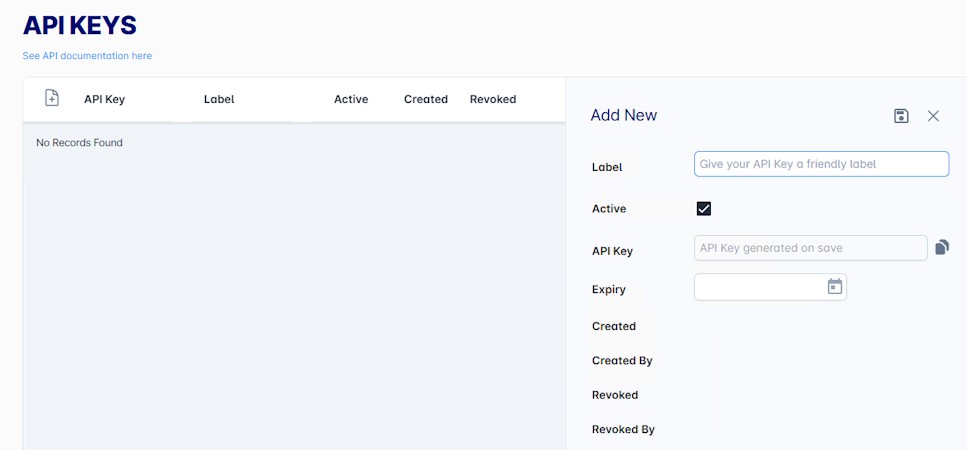
API Keys. -
Add a key with a clear Label and an Expiry date.
Each key shows when it was created and by whom. Untick Active to pause a key. Revoke a key to stop it for good; revoked keys can’t be turned back on, so you’ll need a new one.
When a call works
Every call must include your API key. A call only works when your subscription is current, and the key is active, not revoked and not expired.
Limits
You can make up to 1,000 calls a month and 10 calls a second. Over that, you’ll get an HTTP 429 response, so build in retries with a back-off. Need more? Email support@officemaps.com.
We may pause or revoke a key that’s used outside its intended purpose or our Terms of Service.
Set up webhooks
Webhooks send your app a message the moment something happens in OfficeMaps.
|
Event |
When it’s sent |
|---|---|
|
ReservationCreated |
A desk or room is booked |
|
ReservationCancelled |
A booking is cancelled |
|
CheckedIn |
Someone checks in |
|
CheckedOut |
Someone checks out |
|
PersonStatusChanged |
Someone’s work status changes |
Add a webhook
-
Click Admin, then Administration, then Settings, then Webhooks.
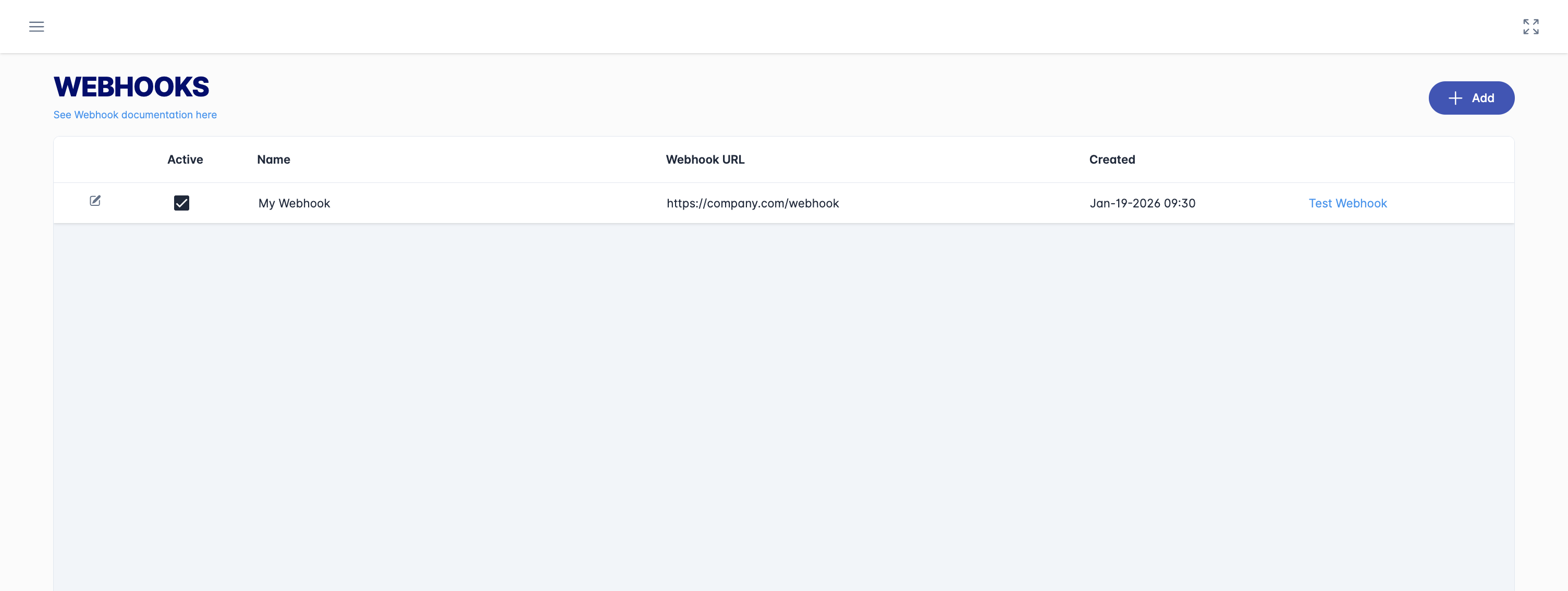
The webhook list. -
Click + Add and fill in the panel:
-
Name: a unique name.
-
Webhook URL: your HTTPS endpoint.
-
Secret Key: click Generate, or enter your own (16–256 characters). Store it safely.
-
Events to Send: choose at least one.
-
-
Click Save.
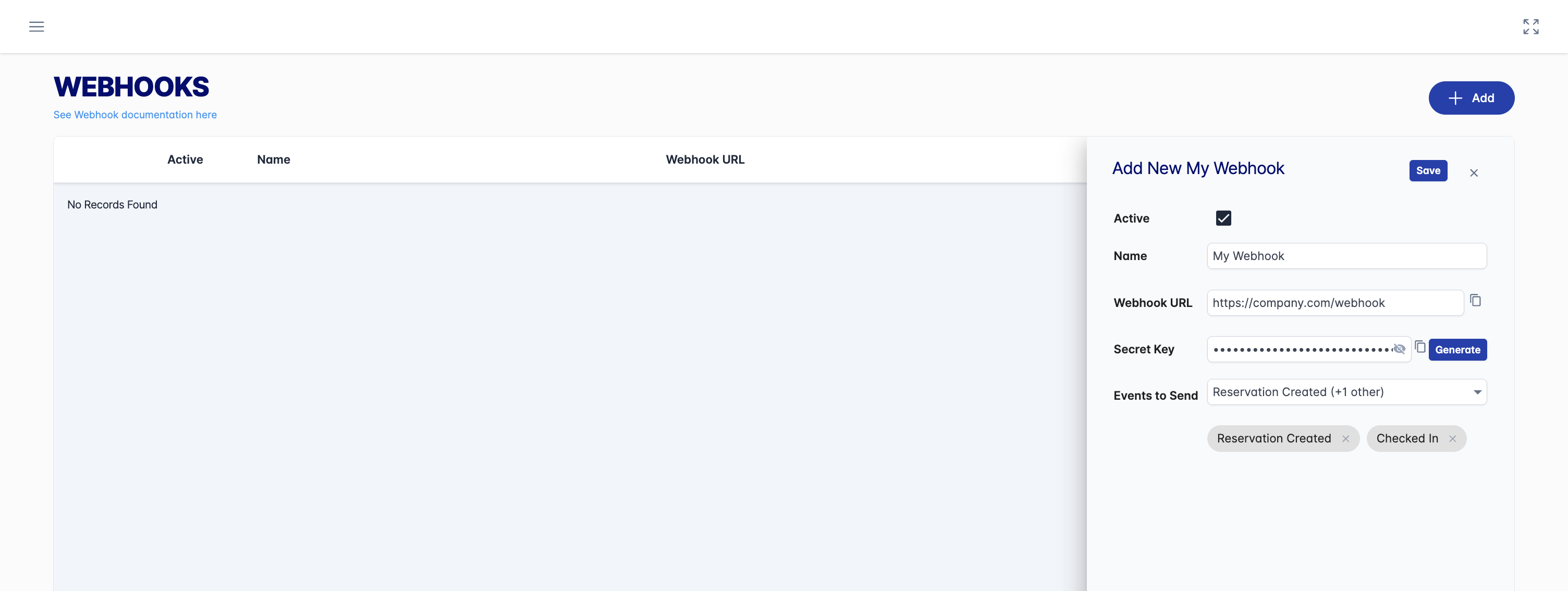
Add a webhook.
To change or delete a webhook, click its pencil icon. To check your endpoint, click Test Webhook.
Webhook Payload Structure
HTTP Request
OfficeMaps sends webhooks as HTTP POST requests with the following characteristics:
|
Property |
Value |
|---|---|
|
Method |
|
|
Content-Type |
|
|
X-Signature |
HMAC-SHA256 signature (lowercase hexadecimal) |
Payload Wrapper
All webhook payloads follow this structure:
{
  "id": "string",
  "type": "string",
  "timestamp": "string",
  "data": { }
}
|
Field |
Type |
Description |
|---|---|---|
|
|
string |
Unique event identifier (UUID) |
|
|
string |
Event type name (e.g., |
|
|
string |
ISO 8601 timestamp when the event occurred (UTC) |
|
|
object |
Event-specific payload data |
Event Types
ReservationCreated
Triggered when a new desk or room reservation is created.
Data Fields
|
Field |
Type |
Description |
|---|---|---|
|
|
string (UUID) |
Unique identifier for the person-asset link |
|
|
string (UUID) |
ID of the person making the reservation |
|
|
string (UUID) |
ID of the reserved asset (desk/room) |
|
|
string |
Name of the asset |
|
|
string (ISO 8601) |
Reservation start time in UTC |
|
|
string (ISO 8601) |
Reservation end time in UTC |
|
|
string (ISO 8601) |
Reservation start time in local timezone |
|
|
string (ISO 8601) |
Reservation end time in local timezone |
|
|
string |
IANA timezone identifier (e.g., |
|
|
string (UUID) |
Site/building ID |
|
|
string |
Site/building name |
|
|
string (UUID) |
Floor/level ID |
|
|
string |
Floor/level name |
|
|
string |
City |
|
|
string |
Region/State |
|
|
string |
Country |
|
|
string |
Floor name |
|
|
string |
Neighbourhood/zone name |
|
|
string |
Person's email address |
|
|
string |
Person's full name |
|
|
boolean |
Whether the reservation is for today |
ReservationCancelled
Triggered when a reservation is cancelled.
Data Fields
|
Field |
Type |
Description |
|---|---|---|
|
|
string (UUID) |
Unique identifier for the person-asset link |
|
|
string (UUID) |
ID of the person who made the reservation |
|
|
string (UUID) |
ID of the reserved asset |
|
|
string |
Name of the asset |
|
|
string (ISO 8601) |
Original start time in UTC |
|
|
string (ISO 8601) |
Original end time in UTC |
|
|
string (ISO 8601) |
Original start time in local timezone |
|
|
string (ISO 8601) |
Original end time in local timezone |
|
|
string |
IANA timezone identifier |
|
|
string |
Floor/level name |
|
|
string |
Floor name |
|
|
string |
Neighbourhood/zone name |
|
|
string |
Person's email address |
|
|
string |
Person's full name |
|
|
string (ISO 8601) |
When the reservation was cancelled (UTC) |
|
|
string |
Who cancelled the reservation |
CheckedIn
Triggered when a user checks into an asset.
Data Fields
|
Field |
Type |
Description |
|---|---|---|
|
|
string (UUID) |
Unique identifier for the person-asset link |
|
|
string (UUID) |
ID of the person checking in |
|
|
string (UUID) |
ID of the asset |
|
|
string |
Name of the asset |
|
|
string (ISO 8601) |
Check-in time in UTC |
|
|
string (ISO 8601) |
Check-in time in local timezone |
|
|
string (ISO 8601) |
Expected check-out time in UTC |
|
|
string (ISO 8601) |
Expected check-out time in local timezone |
|
|
string |
IANA timezone identifier |
|
|
string |
Human-readable timezone name |
|
|
string (UUID) |
Site/building ID |
|
|
string |
Site/building name |
|
|
string (UUID) |
Floor/level ID |
|
|
string |
Floor/level name |
|
|
string |
City |
|
|
string |
Region/State |
|
|
string |
Country |
|
|
string |
Person's email address |
|
|
string |
Person's full name |
|
|
string |
Person's first name |
|
|
string |
Person's last name |
|
|
boolean |
Whether check-in was from a prior reservation |
CheckedOut
Triggered when a user checks out of an asset.
Data Fields
|
Field |
Type |
Description |
|---|---|---|
|
|
string (UUID) |
Unique identifier for the person-asset link |
|
|
string (UUID) |
ID of the person checking out |
|
|
string (UUID) |
ID of the asset |
|
|
string |
Name of the asset |
|
|
string (ISO 8601) |
Check-out time in UTC |
|
|
string (ISO 8601) |
Check-out time in local timezone |
|
|
string (ISO 8601) |
Original check-in time in UTC |
|
|
string (ISO 8601) |
Original check-in time in local timezone |
|
|
string |
IANA timezone identifier |
|
|
string |
Human-readable timezone name |
|
|
string (UUID) |
Site/building ID |
|
|
string |
Site/building name |
|
|
string (UUID) |
Floor/level ID |
|
|
string |
Floor/level name |
|
|
string |
City |
|
|
string |
Region/State |
|
|
string |
Country |
|
|
string |
Person's email address |
|
|
string |
Person's full name |
|
|
string |
Person's first name |
|
|
string |
Person's last name |
PersonStatusChanged
Triggered when a user's work status changes.
Data Fields
|
Field |
Type |
Description |
|---|---|---|
|
|
string (UUID) |
ID of the person |
|
|
string |
Person's full name |
|
|
string |
Person's email address |
|
|
string (UUID) |
Previous status ID (null if no previous status) |
|
|
string |
Previous status name |
|
|
integer |
Previous work day type (see below) |
|
|
string (UUID) |
New status ID |
|
|
string |
New status name |
|
|
integer |
New work day type (see below) |
|
|
integer |
How the status was changed (see below) |
|
|
string (ISO 8601) |
When the status changed (UTC) |
|
|
string |
Optional comment on the status |
|
|
string (ISO 8601) |
When the status expires (null if no expiry) |
|
|
boolean |
Whether the status has been confirmed |
Work Day Type Values
|
Value |
Description |
|---|---|
|
0 |
Non-Work Day |
|
1 |
Office |
|
2 |
Remote |
Status Change Method Values
|
Value |
Description |
|---|---|
|
0 |
Automatic |
|
1 |
Manual (Web App) |
|
2 |
Manual (Mobile) |
|
3 |
On Check-In |
|
4 |
On Check-Out |
|
5 |
Notification Email |
Signature Validation
To ensure webhook requests are authentic and haven't been tampered with, you should validate the X-Signature header.
How Signatures Are Computed
-
The entire JSON payload body is used as input
-
Your webhook secret is used as the HMAC key
-
HMAC-SHA256 is computed
-
The result is converted to a lowercase hexadecimal string
Validation Steps
-
Read the raw request body (do not parse JSON first)
-
Extract the
X-Signatureheader value -
Compute HMAC-SHA256 of the raw body using your webhook secret
-
Convert the hash to lowercase hexadecimal
-
Compare your computed signature with the received
X-Signature
Code Samples
C# (.NET)
using System.Security.Cryptography;
using System.Text;

public class WebhookValidator
{
    public static bool ValidateSignature(string payload, string secret, string receivedSignature)
    {
        var keyBytes = Encoding.UTF8.GetBytes(secret);
        var payloadBytes = Encoding.UTF8.GetBytes(payload);

        using var hmac = new HMACSHA256(keyBytes);
        var hashBytes = hmac.ComputeHash(payloadBytes);
        var computedSignature = Convert.ToHexString(hashBytes).ToLowerInvariant();

        return computedSignature == receivedSignature;
    }
}

// Usage in ASP.NET Core controller:
[HttpPost("webhook")]
public async Task<IActionResult> HandleWebhook()
{
    using var reader = new StreamReader(Request.Body);
    var payload = await reader.ReadToEndAsync();

    var signature = Request.Headers["X-Signature"].FirstOrDefault();
    var secret = "your-webhook-secret";

    if (!WebhookValidator.ValidateSignature(payload, secret, signature))
    {
        return Unauthorized("Invalid signature");
    }

    var webhookEvent = JsonSerializer.Deserialize<WebhookPayload>(payload);
    // Process the event...

    return Ok();
}
Java
import javax.crypto.Mac;
import javax.crypto.spec.SecretKeySpec;
import java.nio.charset.StandardCharsets;

public class WebhookValidator {

    public static boolean validateSignature(String payload, String secret, String receivedSignature) {
        try {
            Mac hmac = Mac.getInstance("HmacSHA256");
            SecretKeySpec secretKey = new SecretKeySpec(
                secret.getBytes(StandardCharsets.UTF_8),
                "HmacSHA256"
            );
            hmac.init(secretKey);

            byte[] hashBytes = hmac.doFinal(payload.getBytes(StandardCharsets.UTF_8));
            String computedSignature = bytesToHex(hashBytes).toLowerCase();

            return computedSignature.equals(receivedSignature);
        } catch (Exception e) {
            return false;
        }
    }

    private static String bytesToHex(byte[] bytes) {
        StringBuilder sb = new StringBuilder();
        for (byte b : bytes) {
            sb.append(String.format("%02x", b));
        }
        return sb.toString();
    }
}

// Usage in Spring Boot controller:
@PostMapping("/webhook")
public ResponseEntity<String> handleWebhook(
        @RequestBody String payload,
        @RequestHeader("X-Signature") String signature) {

    String secret = "your-webhook-secret";

    if (!WebhookValidator.validateSignature(payload, secret, signature)) {
        return ResponseEntity.status(HttpStatus.UNAUTHORIZED).body("Invalid signature");
    }

    // Process the event...
    return ResponseEntity.ok("OK");
}
JavaScript (Node.js)
const crypto = require('crypto');

function validateSignature(payload, secret, receivedSignature) {
    const computedSignature = crypto
        .createHmac('sha256', secret)
        .update(payload, 'utf8')
        .digest('hex');

    return computedSignature === receivedSignature;
}

// Usage with Express:
const express = require('express');
const app = express();

app.post('/webhook', express.raw({ type: 'application/json' }), (req, res) => {
    const payload = req.body.toString('utf8');
    const signature = req.headers['x-signature'];
    const secret = 'your-webhook-secret';

    if (!validateSignature(payload, secret, signature)) {
        return res.status(401).send('Invalid signature');
    }

    const event = JSON.parse(payload);
    // Process the event...

    res.status(200).send('OK');
});
Python
import hmac
import hashlib

def validate_signature(payload: str, secret: str, received_signature: str) -> bool:
    computed_signature = hmac.new(
        secret.encode('utf-8'),
        payload.encode('utf-8'),
        hashlib.sha256
    ).hexdigest()

    return hmac.compare_digest(computed_signature, received_signature)

# Usage with Flask:
from flask import Flask, request, abort
import json

app = Flask(__name__)

@app.route('/webhook', methods=['POST'])
def handle_webhook():
    payload = request.get_data(as_text=True)
    signature = request.headers.get('X-Signature')
    secret = 'your-webhook-secret'

    if not validate_signature(payload, secret, signature):
        abort(401, 'Invalid signature')

    event = json.loads(payload)
    # Process the event...

    return 'OK', 200
Example Payloads
ReservationCreated Example
{
  "id": "a1b2c3d4-e5f6-7890-abcd-ef1234567890",
  "type": "ReservationCreated",
  "timestamp": "2024-01-15T09:30:00Z",
  "data": {
    "personAssetId": "f47ac10b-58cc-4372-a567-0e02b2c3d479",
    "personId": "550e8400-e29b-41d4-a716-446655440000",
    "assetId": "6ba7b810-9dad-11d1-80b4-00c04fd430c8",
    "assetName": "Desk A-101",
    "reservationStartTimeUtc": "2024-01-16T09:00:00Z",
    "reservationEndTimeUtc": "2024-01-16T17:00:00Z",
    "reservationStartTimeLocal": "2024-01-16T20:00:00",
    "reservationEndTimeLocal": "2024-01-17T04:00:00",
    "timezoneIana": "Australia/Sydney",
    "siteLocationId": "7c9e6679-7425-40de-944b-e07fc1f90ae7",
    "siteLocationName": "Sydney HQ",
    "siteLevelId": "8f14e45f-ceea-467f-a0e8-14db0148c3a1",
    "siteLevelName": "Level 5",
    "city": "Sydney",
    "region": "NSW",
    "country": "Australia",
    "floorName": "Floor 5",
    "neighbourhoodName": "Engineering Zone",
    "personEmail": "john.smith@example.com",
    "personFullName": "John Smith",
    "reservationIsToday": false
  }
}
ReservationCancelled Example
{
  "id": "b2c3d4e5-f6a7-8901-bcde-f12345678901",
  "type": "ReservationCancelled",
  "timestamp": "2024-01-15T10:15:00Z",
  "data": {
    "personAssetId": "f47ac10b-58cc-4372-a567-0e02b2c3d479",
    "personId": "550e8400-e29b-41d4-a716-446655440000",
    "assetId": "6ba7b810-9dad-11d1-80b4-00c04fd430c8",
    "assetName": "Desk A-101",
    "reservationStartTimeUtc": "2024-01-16T09:00:00Z",
    "reservationEndTimeUtc": "2024-01-16T17:00:00Z",
    "reservationStartTimeLocal": "2024-01-16T20:00:00",
    "reservationEndTimeLocal": "2024-01-17T04:00:00",
    "timezoneIana": "Australia/Sydney",
    "siteLevelName": "Level 5",
    "floorName": "Floor 5",
    "neighbourhoodName": "Engineering Zone",
    "personEmail": "john.smith@example.com",
    "personFullName": "John Smith",
    "cancelledAt": "2024-01-15T10:15:00Z",
    "cancelledBy": "john.smith@example.com"
  }
}
CheckedIn Example
{
  "id": "c3d4e5f6-a7b8-9012-cdef-123456789012",
  "type": "CheckedIn",
  "timestamp": "2024-01-16T09:05:00Z",
  "data": {
    "personAssetId": "f47ac10b-58cc-4372-a567-0e02b2c3d479",
    "personId": "550e8400-e29b-41d4-a716-446655440000",
    "assetId": "6ba7b810-9dad-11d1-80b4-00c04fd430c8",
    "assetName": "Desk A-101",
    "checkInTimeUtc": "2024-01-16T09:05:00Z",
    "checkInTimeLocal": "2024-01-16T20:05:00",
    "expectedCheckOutTimeUtc": "2024-01-16T17:00:00Z",
    "expectedCheckOutTimeLocal": "2024-01-17T04:00:00",
    "timezoneIana": "Australia/Sydney",
    "timezoneDisplayName": "Australian Eastern Daylight Time",
    "siteLocationId": "7c9e6679-7425-40de-944b-e07fc1f90ae7",
    "siteLocationName": "Sydney HQ",
    "siteLevelId": "8f14e45f-ceea-467f-a0e8-14db0148c3a1",
    "siteLevelName": "Level 5",
    "city": "Sydney",
    "region": "NSW",
    "country": "Australia",
    "personEmail": "john.smith@example.com",
    "personFullName": "John Smith",
    "firstName": "John",
    "lastName": "Smith",
    "fromReservation": true
  }
}
CheckedOut Example
{
  "id": "d4e5f6a7-b8c9-0123-def0-234567890123",
  "type": "CheckedOut",
  "timestamp": "2024-01-16T17:30:00Z",
  "data": {
    "personAssetId": "f47ac10b-58cc-4372-a567-0e02b2c3d479",
    "personId": "550e8400-e29b-41d4-a716-446655440000",
    "assetId": "6ba7b810-9dad-11d1-80b4-00c04fd430c8",
    "assetName": "Desk A-101",
    "checkOutTimeUtc": "2024-01-16T17:30:00Z",
    "checkOutTimeLocal": "2024-01-17T04:30:00",
    "checkInTimeUtc": "2024-01-16T09:05:00Z",
    "checkInTimeLocal": "2024-01-16T20:05:00",
    "timezoneIana": "Australia/Sydney",
    "timezoneDisplayName": "Australian Eastern Daylight Time",
    "siteLocationId": "7c9e6679-7425-40de-944b-e07fc1f90ae7",
    "siteLocationName": "Sydney HQ",
    "siteLevelId": "8f14e45f-ceea-467f-a0e8-14db0148c3a1",
    "siteLevelName": "Level 5",
    "city": "Sydney",
    "region": "NSW",
    "country": "Australia",
    "personEmail": "john.smith@example.com",
    "personFullName": "John Smith",
    "firstName": "John",
    "lastName": "Smith"
  }
}
PersonStatusChanged Example
{
  "id": "e5f6a7b8-c9d0-1234-ef01-345678901234",
  "type": "PersonStatusChanged",
  "timestamp": "2024-01-16T08:45:00Z",
  "data": {
    "personId": "550e8400-e29b-41d4-a716-446655440000",
    "personFullName": "John Smith",
    "personEmail": "john.smith@example.com",
    "oldPersonStatusId": "9a8b7c6d-5e4f-3a2b-1c0d-9e8f7a6b5c4d",
    "oldPersonStatusName": "Remote",
    "oldWorkDayType": 2,
    "newPersonStatusId": "1a2b3c4d-5e6f-7a8b-9c0d-1e2f3a4b5c6d",
    "newPersonStatusName": "In Office",
    "newWorkDayType": 1,
    "statusChangeMethod": 1,
    "statusChangedAtUtc": "2024-01-16T08:45:00Z",
    "personStatusComment": null,
    "personStatusExpiry": null,
    "isStatusConfirmed": true
  }
}
Remove permissions in Microsoft Entra
-
In the Entra admin center, open Enterprise applications.
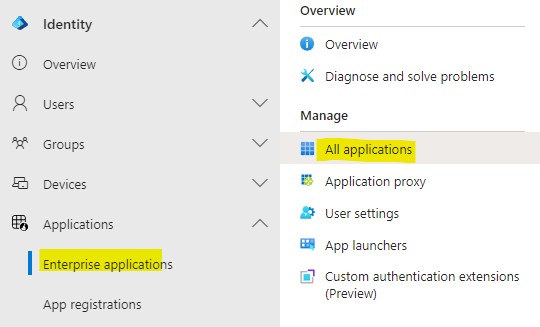
Enterprise applications. -
Click the OfficeMaps application, then the Permissions tab.
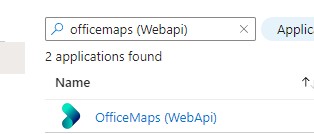
The OfficeMaps application. 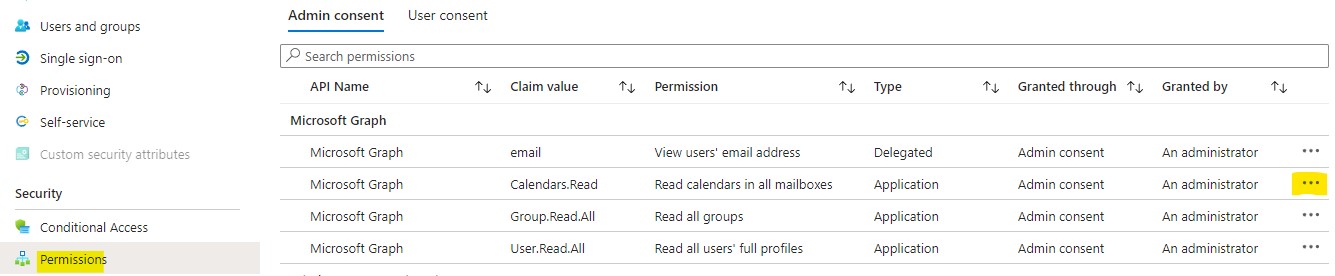
The Permissions tab. -
Next to the permission, click …, then Revoke permission, then Yes, revoke.
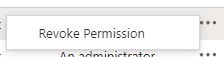
Revoke permission. 
Confirm.
OfficeMaps can no longer act with that permission. To restore the original permissions, click Consent on the integration in OfficeMaps.